Showing posts with label Dina Wakley Media Tape. Show all posts

Saturday, 18 August 2018

Beautiful Girls

Hello everyone,  Monique here with my second AALL & Create challenge layout.  This time, as well as doing a bit of stencil work, I also used the really cool Stamp Set #35.

I couldn't resist the cute little parrot in a tutu and just had to use it as an embellishment on my layout. With that in mind, I chose to do a bright, fun layout about my two beautiful nieces.

I started by creating my background.  I decided to break out the gorgeous Prima Watercolour Confections set in  Odysee and use the Amsterdam and Tokyo colours.  I started with the Tokyo hot pink, and brushed it on to my cardstock base, spraying it with water to spread it around, then drying it with my heat tool.  I then applied the Amsterdam purple the same way.


Once both layers were dry  I tore some large hearts from the Dina Wakley collage tissue paper and adhered them onto the background with some Liquitex Acrylic Fluid Matte Medium.  I then stamped some of the small hearts from the AALL & Create Stamp Set #35.


Next, I used an AALL & Create Stencil #16 to pop on some white texture paste.


I then made a photo mat with some 7 Dots Paint Chips Razzleberry Paper and Tags.


 I then adhered my photo to the photo mat and popped it on my layout using some thick card to give it some dimension.


I then added all my embellishments.  First of all, I stamped that cute little parrot stamp from the AALL & Create Stamp Set #35 - using archival ink.  I then used the Prima Watercolour Confections Odyssey set to add some colour.  This time I chose to use the Jamaica colour primarily, and accents of Tokyo and Dubai.
Next, I painted the Blue Fern Studio Eclectic Hearts in Dylusions Crushed Grape, and arranged them as accents around the photo with the parrot, some Paint Chips Die Cut Elements, some Dina Wakley Media Tape and some Mambi Chips, the ones I used aren't there, but there are just sooooooo many to choose from!

Whenever I add embellishments to my layout, I always make sure I arrange them so that they drew attention to my photo.  One way to do this is to create an imaginary triangle with the photo placed within it.

Here are some close ups:


Here are the links to the products I've used that can be found in the Scrap Matrix Shop


Thank you for popping by the blog today, I hope you have been inspired to break out your AALL&Create Stamps and Stencils today.  It isn't too late to enter our fabulous challenge, all you have to do is create something using AALL and Create products, then upload it into the "AALL&Create" folder on the Scrap Matrix Shares Facebook page.  Don't forget to mention the products from the Scrap Matrix shop you've used, and you will be in the running!!  It's that simple.

Until next time scrappy friends!


Monday, 21 May 2018

"Seriously On Point" by Tammy

Good morning my lovelies
 
It's my turn to share the layout I created for our current 'The Point Is' Challenge.
 
Here it is.....


A fun layout with photos taken just prior to my girl hopping on stage and performing a Hip Hop Routine.
 
I wanted to capture the 'teenage attitude' so I selected bright colours, funky stamps that look like hand drawn doodling. I felt the 'pointy' theme was perfect for this age group.
 
 
 To go with the theme I went with the title 'Seriously On Point'. LOL
 
 
 So I began by selecting a sheet of 7Dots Paper for my background.
The paint splatters were perfect.
 
 
I swiped them randomly across my page using an old store card.
 
 
 I then added some Dina Wakley Washi Tape in a chevron pattern.


I love this stamp set by Paper Artsy and knew it would be perfect for this layout.
I used the 3 arrow sets on the bottom right hand side and the file tab stamp and some lettering.
 
I can see this being a very handy stamp.
 
 
 I  stamped the arrows onto the layout, ensuring they faced towards where I was going to add my photo. This draws the eyes into the photos and ensures the focus is on them.


I then pulled out a paper I had created a few weeks ago - my first play with the Gelli Plate!
I'd used a cool 13Arts stencil with lots of triangles.....perfect, and I knew the colour would make the page pop.
I achieved the colour using Paper Artsy 'Tracy Scott' Paints.


I then cut out some taggy bits and also used the file tab stamp and cut this out too.
 
 
 I then placed my photos down, and began tucking in the above items.

I made my own tags from the 6x6 Paper Pad. which I also tucked around the page.


I then added a few embellishments from the Paint Chips range.....arrows, word stickers etc.
 
 
 The final touches were to add the title from the Mambi Chip Stickers.
These have really been turning up on all my layouts!!
 
I simply wrote on an embellishment for the rest of the title.
 
 
Oh yeah, I nearly forgot, I swiped black paint around the edges to completely finish it off and added a few splashes of paint.
 
 
Here's a bit of a close up.....I love how the various arrows/points look like I've drawn them on.
These stamps print so very quickly.
 
 
Fun, vibrant and ON POINT! Lol


 So that's it from me today!
 
I'd love you to join in with our challenge this month....
 
It's super easy, you don't even need a blog!
Just head to our Scrap Matrix Shares Page and pop it in the correct album.
 
The only rule is that you MUST use some Scrap Matrix products!
But hey that's super easy.....all my layouts are covered in them.
Just let us know which products you used in the comments.
 
That's it!
 
 
You can see more on my BLOG and a link of Scrap Matrix Products used below:
 
Tracy Scott Paints


Wednesday, 7 March 2018

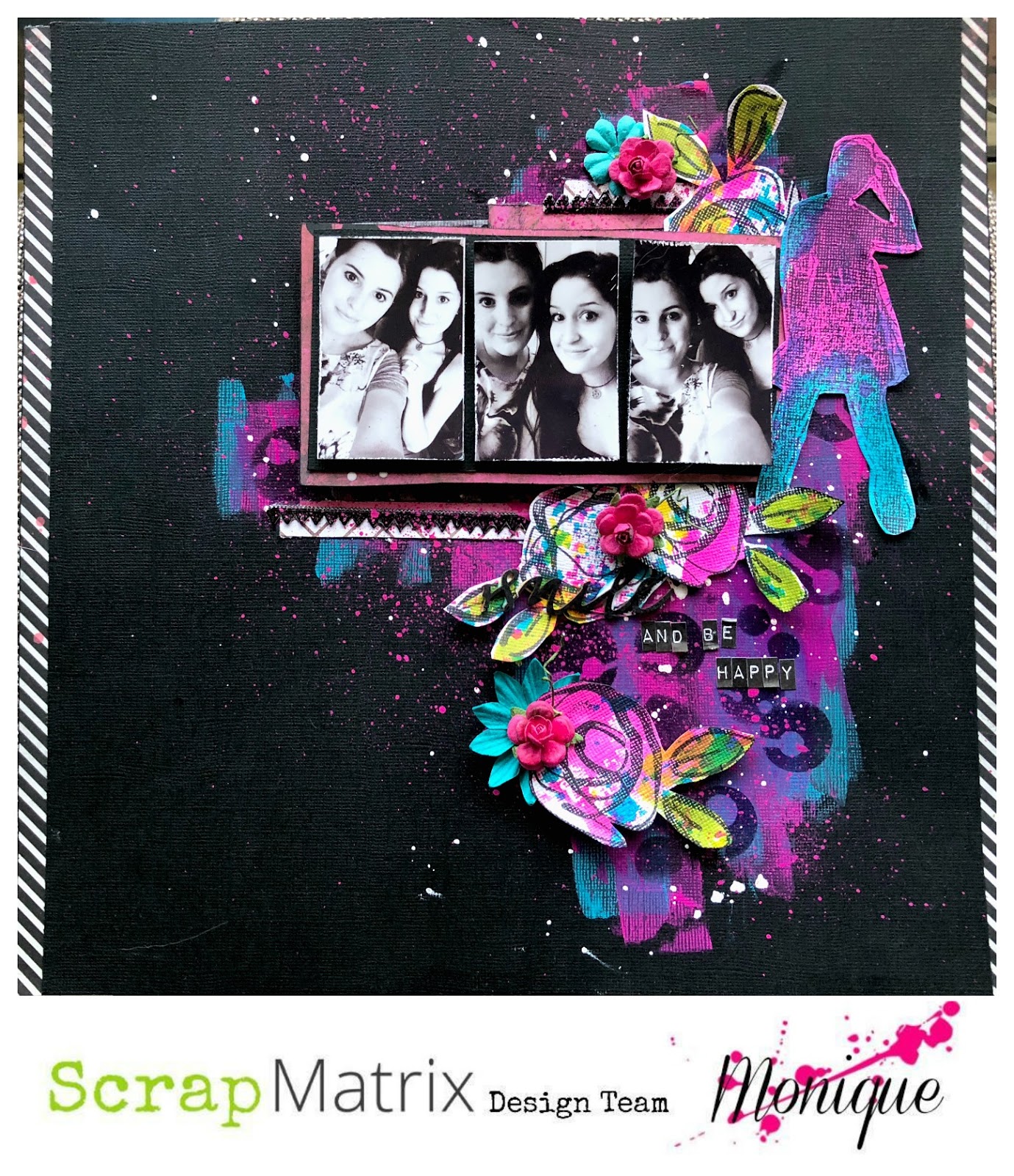
Smile and Be Happy

Hi Everyone,

Monique back again with my second "All Things Ranger" challenge.

This time, I went to town with paint and colour - using Dylusions Paints and Inks some gorgeous Dina Wakely Stamps.


I have done a quick step by step for this layout, hope you find it helpful!

1.  Scrape some Dylusions Paint in Bubblegum Pink on a piece of black cardstock.  Dry, then apply some Dylusions Paint in Calypso Teal.  


2.  Using the 6x6 13 Arts Stencil "Galaxy,"  stamp some Archival ink in black over the paint. Randomly splatter some white gesso on the background to tone down the colours a touch.


3.  Let's move onto the stamped embellishments.  I got out my two favourite Dina Wakley Stamps.  The Silhouette Woman Stamp, and the Abstract Bloom Stamp.


I then used a technique I have picked up from my gorgeous Scrap Matrix Design Team mate Tammy Klinger.  I sprayed some Dylusions Ink in Bubblegum Pink on an empty stamp packet.  (The picture is of Lemon Squeeze Ink - which I decided not to use.)  


Next, I "splotched" the ink onto some white cardstock and dried it with a heat tool.  I added some "Calypso Teal" Ink the same way, until I was happy with the result.


I then stamped several of the Abstract Bloom Stamps and one Silhouette Woman onto the ink splotches, and then cut all my images out.


NOTE:  I added some Calypso Teal Ink to my Silhouette Woman, and some Lime Green Ink to the leaves of the stamped Abstract Flowers with a paintbrush after I fiddled with the embellishments on my layout and decided more colour was needed.

4.  Let's get back to the layout.  I backed my photos with some black cardstock, and then added another layout with some 7 Dots Studio "Paint Chips" paper - "Glaze."  

5.  I positioned my photo mat on my background, then lightly marked where the edges were.  Next, I added a few layers on the background where the top and bottom of my photos would be.  I used some 7 Dots Studio "Paint Chips" - Glaze paper, some Dina Wakley Media tape, and some German Scrap Baroque Black.


6.  To put my layout together, I added my photos, my stamped images, and some flowers.  I also splattered some watered down Dylusions paint in Bubblegum Pink. Finally, I inked the word "smile" from the 13 Arts "Art Journey" Chipboard and added the words "and be happy" using the Tim Holtz Ideology Label Letters to add a title.
I hope you have enjoyed this little tutorial, don't forget you still have until the 14 March to complete your entry and upload it into "All Things Ranger" album in the Scrap Matrix Shares Facebook page.

Here is a full list, with links, of the Scrap Matrix products I used:

Dina Wakley Stamps - "Abstract Flowers" and "Silhouette Woman"